%201.png)
AP Invoice Scanning Software. Because Your Finance Team Has Enough On Their Plate
Invoice capture doesn’t have to be tedious… but it so often is! That’s exactly why we designed our ExpenseOnDemand AP invoice scanning software. Use it to digitise incoming invoices, eliminate manual data entry, and feed accurate information directly into your accounts payable workflow. It’s perfect for finance teams who want to reduce admin and stay in control.

Award winning & trusted by
%2020s-p-500.png.webp)




What exactly is AP invoice scanning software?
AP invoice scanning software uses OCR (Optical Character Recognition) to extract key details from paper invoices or digital invoices. The captured data is passed straight into your accounts payable process, where it can be reviewed, approved, and processed faster than ever before.
Turn paper into searchable digital files
Turn paper into searchable digital files
Turn paper into searchable digital files
Turn paper into searchable digital files
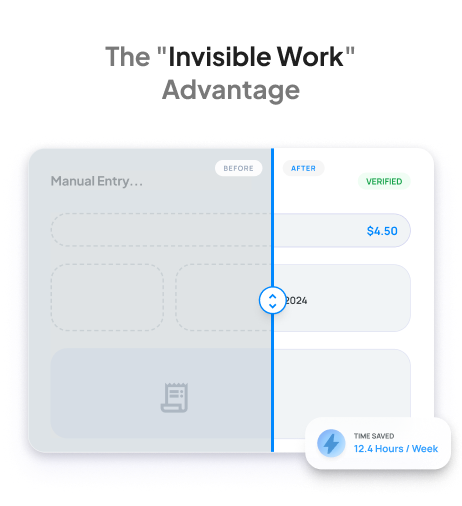
Accurate invoice capture across every format
Our automated invoice scanning software recognises a wide range of invoice formats, including typed, scanned, or emailed. Built-in pattern recognition improves over time, meaning fewer manual corrections with every batch. Finance teams can stop firefighting formatting issues and start working with data they can trust.

Wide input range: Scan PDFs, paper, or image files
Vendor recognition: Adapt to different invoice templates
Fewer edits: Trust what comes through the system
From inbox to invoice data – no typing required
Our ExpenseOnDemand software scans invoices and converts them into structured, usable data in seconds. The system automatically extracts details like invoice number, supplier name, and totals, so your team can skip the spreadsheet work and focus on reviewing. We also have a very similar solution for your expense receipts.
OCR accuracy: Capture invoice details with precision
Data flow: Send the extracted information into your workflow
Time savings: Reduce interruptions and avoid rekeying
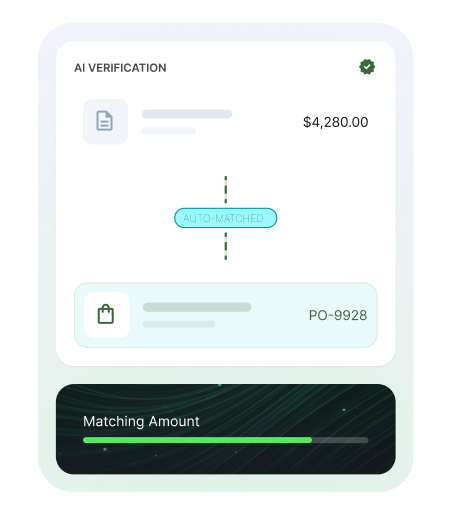
See our AP invoice scanning software in action
Your invoice processing is about to get a whole lot easier
Did someone say automated invoice processing?
You asked, we listened. Find out what our AI technology could do for your accounts payable process. Book a free demo now.
Stay compliant, audit-ready, and in control
Compliance often gets left until year-end, but with ExpenseOnDemand, audit trails build themselves. Each scanned invoice is logged from first capture to final approval, creating a complete record of every step taken. If your finance lead needs a payment trail or your auditor wants proof of approval, you’ll find them clearly documented and safely stored.
Log history: Track who approved what, and when
Central records: Store files securely in one location
Quick lookup: Find what you need without delay
Intelligent tools for fast, accurate data capture
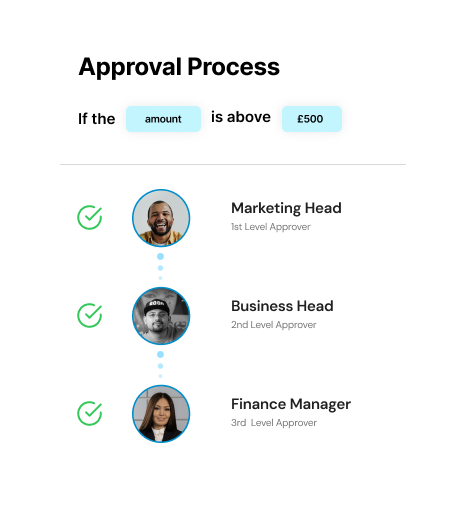
With our ExpenseOnDemand software, scanned invoices don’t just sit in a shared inbox; they’re automatically routed based on rules you set. Whether it’s supplier-specific routing, spend thresholds, or approval responsibility, the system moves the right data to the right people. Finance doesn’t need to chase updates or guess where things stand. Your workflow keeps moving, even when your team is focused elsewhere.
Routing: Push scanned invoices to assigned reviewers
Focus: Highlight only what’s needed for action
Visibility: Stay informed without micromanaging


Trusted by
+15000 Companies
Businesses Love Our Fast & Easy
Automated Invoice Processing
Global finance leaders turn to ExpenseOnDemand for revolutionary employee expense management, streamlining reconciliation, and total expense transparency. See what our customers love.
"Excellent tool, intuitive and easy to use. Great value for money and awesome functionality"
Chris C
Finance Manager

5.0
"Excellent tool, intuitive and easy to use. Great value for money and awesome functionality"
Chris C
Finance Manager
5.0
"Excellent tool, intuitive and easy to use. Great value for money and awesome functionality"
Chris C
Finance Manager
5.0
"Excellent tool, intuitive and easy to use. Great value for money and awesome functionality"
Chris C
Finance Manager
5.0
From the onboarding to testing, the process was very seamless. This made our negotiation and closing the deal very easy and straight forward. - Finance Manager
Finance Manager
Real Estate
5.0
With ExpenseOnDemand, we have effortlessly automated expense reporting and this gives us real-time expense visibility. The platform has also helped us reduce fraud and human errors, and also speed up expense reimbursement.
Engineer
Telecommunications
5.0
Platform is easy to use and requires minimal maintenance. The team at EOD always kept and open communication despite the timezone difference.
IT Manager
Healthcare and Biotech
5.0
Very straightforward system to implement, in our instance supporting 120 users. Super easy to use and the AI scanning function of receipts is simply awesome!
Head of Operations
<50M USD
5.0
Excellent product, small app price with big app functionality.
Director of Finance
Manufacturing
5.0
It has very good reposting features, smart scan and Accounting Integration.
IT Manager
IT Services
5.0
The ExpenseOnDemand platform is seamless and simple to use.
Finance Manager
Finance (non-banking)
5.0
Great, smooth experience from trial through to deployment.
Director
IT Services
5.0
"Excellent tool, intuitive and easy to use. Great value for money and awesome functionality"
Chris C
Finance Manager
5.0
"Excellent tool, intuitive and easy to use. Great value for money and awesome functionality"
Chris C
Finance Manager
5.0
"Excellent tool, intuitive and easy to use. Great value for money and awesome functionality"
Chris C
Finance Manager
5.0
"Excellent tool, intuitive and easy to use. Great value for money and awesome functionality"
Chris C
Finance Manager
5.0
"Excellent tool, intuitive and easy to use. Great value for money and awesome functionality"
Chris C
Finance Manager
5.0
"Excellent tool, intuitive and easy to use. Great value for money and awesome functionality"
Chris C
Finance Manager
5.0
"Excellent tool, intuitive and easy to use. Great value for money and awesome functionality"
Chris C
Finance Manager
5.0
"Excellent tool, intuitive and easy to use. Great value for money and awesome functionality"
Chris C
Finance Manager
5.0
Very helpful support team, great product, cost effective for any type of organisation as you will only be paying for the futures you are using.
Customer Relationship Manager
Real Estate
5.0
The ExpenseOnDemand platform is seamless and simple to use.
Finance Manager
Finance (non-banking)
5.0
Super fast team member setup / onboarding, loads of control / transparency. Asking a team member to pickup something for the office has never been easier.
Manager of IT Services
IT Services
5.0
Expense On Demand is a great tool for managing our expenses. The onboarding was very quick and simple, the configuration was easy to do, and the team have had no trouble in claiming expenses.
Finance Analyst
Energy and Utilities
5.0
AP invoice scanning with ExpenseOnDemand
Designed for employees, finance teams, and CFOs, our new integrations make expense tracking, approvals, and compliance effortless.

Employees
Efficient. Convenient. Accurate.
Say goodbye to mind-numbing manual tasks – automate to elevate.

Finance Teams
Empowered. Transparent. Integrated.
This is what good financial planning looks like.

Leadership
Smart. Strategic. Cost-saving.
Easy-to-digest analytics keep your financial health in tip-top condition.
Frequently Asked Questions
FAQs: AP Invoice Scanning Software
Find quick answers or contact our support team
What does AP invoice scanning software do?

It scans invoices using OCR, extracts the key data, and sends it into your approval process. That means fewer delays and fewer manual tasks.
Does AP invoice scanning software support different invoice formats?
Yes. Whether invoices are scanned, emailed, or printed, the software captures and processes them with minimal configuration.
How accurate is the data capture from AP invoice scanning software?
The software captures most fields correctly on the first go. Over time, it learns from your invoice data capture and improves its recognition patterns, ensuring accurate data capture
Is manual checking still needed when using AP invoice scanning software?
Only for exceptions. The majority of invoices are processed without edits, and flagged fields are easy to review.
Can AP invoice scanning software integrate with my accounting system?
Yes. ExpenseOnDemand works with major platforms. Our automated invoice capture software allows data to flow directly into your finance environment.
Come join the future of expense management
We make your pain points… painless.